Nov 06, 2026 / By the Lumibox team / in LED Guides
Smart light switches, Wi-Fi controllers, remotes and motion sensors all answer the same question: how do you get the lights to do what you want without walking to the wall every time? The short answer is to pick the control by the job. Use a smart switch or smart dimmer where there is already a wall box, a Wi-Fi or RF controller for LED strips, and a motion sensor for any space where hands are full or lights get left on.
This guide is for homeowners planning a renovation, electricians and property managers. It covers connected controls only: Wi-Fi, remotes, 3-way smart switches, occupancy sensors and strip controllers. For dimming methods such as TRIAC, ELV and 0-10 V, flicker and minimum load, see our LED dimmer switch guide. When you are ready to compare models, start with our Wi-Fi and smart controllers.
"Smart lighting" is a family of controls, each solving a different problem. The table sums up where each one fits.
| Control | Best for | Works with | What to check |
|---|---|---|---|
| Smart switch or smart dimmer | Replacing an existing wall switch | Ceiling lights, pot lights, dimmable LED bulbs | Single-pole or 3-way, neutral wire in the box, dimmable load |
| Wireless remote | Control from the couch or the bed, no new wiring | Paired switches, controllers or fixtures | Which receiver it pairs with |
| Wi-Fi or RF strip controller | LED strips, colour and tunable white | 12 V or 24 V strips | Strip type, amps per channel, total output |
| Wall occupancy sensor | Halls, laundry rooms, washrooms, garages | House-circuit lighting | Sensitivity and time delay settings |
| Low-voltage motion or door switch | Closets, cabinets, drawers, pantries | 12-24 V DC strips and accent lights | Input voltage, maximum load, mounting style |
| Fixture-mounted sensor | High bays, wall packs, vapour-tight fixtures | The fixture series it was made for | Compatible models and mounting height |
A smart switch sits in the wall box like any switch, but it can also be controlled wirelessly. A smart dimmer does the same and lets you set the light level. The fixtures stay; only the control changes.
Before buying, open the box (power off at the panel) and look at three things. First, is it a single-pole switch or one of a pair that controls the same light? Second, is there a neutral wire? Many smart switches need one to power their own electronics, so check the product before you assume. Third, are the lights dimmable? A smart dimmer on a non-dimmable LED driver will cause the same problems as any other dimmer.
Browse our light switches for standard and smart models, and our LED dimmers if you want light-level control at the wall.
Wi-Fi devices connect to your home network, so you can control them from a phone and, on many models, through popular voice assistants. RF (radio) devices talk directly to their remote or receiver instead. They do not need the router, and they keep responding when the Wi-Fi is busy or down. Some controllers offer both, which is often the best of both worlds.
A 3 way smart switch is the answer for stairs, long hallways and open-concept rooms where you want to control the same light from two places. With smart controls, you usually install one smart unit that does the real switching and pair it with a companion or a remote at the other location. The exact wiring depends on the product, so follow its instructions or call an electrician.
Two practical options exist in our catalogue. The NEXLEDS 3-way smart switch dimmer (NX-SSWD-N) is designed for standard 3-way configurations and replaces traditional toggle or rocker switches with smooth dimming. The same dimmer also comes bundled with a remote: the 3-way smart switch dimmer with remote controller (NX-SSWD-NR) adds control from anywhere in the room. For a staircase layout, our LED staircase lighting page shows fixtures that pair well with this kind of control.
Yes, if the sensor is rated for 3-way use or paired with a companion device at the second location. Check its documentation and have a licensed electrician confirm the wiring.
A wireless remote is the easiest way to add a second control point. The remote talks to a receiver, a smart switch or the fixture itself. Remotes do two different jobs.
A remote only works with the receiver it was made for. Check the compatible model numbers on the product page before you order. Our remotes and LED strip remotes and controllers are sorted to make this easier.
LED strips do not use a wall dimmer directly. The control sits between the power supply and the strip, on the low-voltage side. That is where a smart controller comes in: it receives commands from an app, a voice assistant or a remote and drives the strip channels.
The CANOLIGHT 5-in-1 Wi-Fi and RF 2.4 GHz controller (CL-AST-SWCWL5-LV) is a good example of what to look for. One unit handles single colour, tunable white (3CCT), RGB, RGBW and RGBCW strips. It connects to the home network for phone and voice control, and its RF 2.4 GHz remote link keeps working when the Wi-Fi is busy. It is rated 6A per channel with a 15A total output, which tells you how much strip it can drive.
For larger homes, a Wi-Fi bridge can manage several zones. The controller and Wi-Fi bridge for white or RGBW LED (LCRECEPTWIFI-LC) lets you adjust brightness, change colours and set schedules for compatible white and RGBW products across multiple zones.
New to strips? Our guide on how to install LED strip lights explains the power supply, wiring and layout before you add the controller.
Motion sensor lights turn on when someone walks in and off once the space is empty. They suit garages, basements, laundry rooms, closets, stairwells and side entrances. Our motion sensors category groups them by type.
Most sensors use one of two detection methods. A PIR (passive infrared) sensor reacts to body heat moving across its field of view. A microwave sensor sends out a low-power signal and reads the reflection, so it can pick up smaller movement and react through thin materials. The TUROLIGHT Deltalum EC2 microwave sensor for 12V DC strips is built for that: its product page describes detection through doors and cabinetry. Dual-technology sensors combine both. The TUROLIGHT PIR and microwave high bay sensor controller uses the pair for fewer false triggers in workshops and large rooms.
A wall-mounted occupancy sensor replaces a regular switch in the wall box and controls lights on the house circuit, which is usually 120 V in a home. The TUROLIGHT PIR wall-mounted occupancy sensor (TL-8012) is designed to replace a standard light switch and turns the lights off after you leave the room. The TL-6012 version offers adjustable sensitivity and timing settings.
Inside cabinets, closets and drawers, the sensor works on the 12-24 V DC side, between the power supply and the strip. LUMENSTARLED offers three formats: the LS-MS surface-mount motion sensor (12-24V DC, 6A, timer 1-10 min), the LS-MS-PIR switch for a flush, recessed install, and the LS-MS-PIR3 with an adjustable time delay (12-24V DC, 6A max load). For doors and drawers, a magnetic switch for 12-24V DC systems (LS-MAG-SW) turns the light on when the door opens and off when it closes. It is ideal for a pantry or a wardrobe.
Commercial fixtures often take a matching sensor. CSC LED makes several: the MS02-MW-HW-DC 12V sensor for mounting heights up to 12 ft, the MS03-MW-HW-DC for up to 25 ft, the VTHB-IMS for ST4 and VT4 fixtures mounted over 4 m, and the HB01DMS-C for CWP04 and AWP04 wall packs. Always pick the sensor from the fixture's own compatibility list. For the garage and shop side, read our garage and workshop LED lighting guide.
Many do, because the switch needs a small constant supply for its wireless electronics. Some models are designed to work without one. Check the product specifications and look in the wall box before buying.
Usually one smart switch or smart dimmer that does the switching, plus a companion or a remote at the second location. A kit with a remote, such as the NEXLEDS NX-SSWD-NR, adds control from anywhere in the room.
Often, yes. A wall occupancy sensor goes in the existing switch box. For LED strips, a low-voltage sensor connects between the power supply and the strip. Fixture sensors attach to compatible fixtures only.
Wi-Fi gives app, schedule and voice control. RF responds directly, even when the network is busy. A controller that supports both, like the CANOLIGHT CL-AST-SWCWL5-LV, gives you the two options.
Where it can "see" the entrance and the path people take: at the top of a stair, facing a garage door, inside a closet or under a cabinet. Respect the mounting height listed for the sensor.
No. The bulb or fixture must be dimmable, and the dimmer must suit the load. Our dimmer guide, linked above, explains how to match them and stop flicker.
Ready to make your lighting respond to you? Compare our Wi-Fi and smart controllers and build the setup that fits each room.
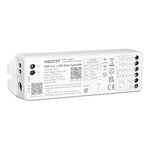 WIFI AND RF2.4GHZ SINGLE COLOR 3CCT RGB|RGBW|RGBCW 5 IN 1 CONTROLLER LOW VOLTAGE 6A/ CHANN...
 CONTROLLER / WIFI BRIDGE - WHITE OR RGBW
 SMART WIFI DOOR CONTACT DETECTOR
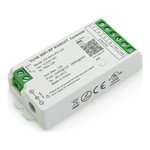 CUL CERTIFIED LED CONTROLLER, WIFI AND RF2.4GHZ, SINGLE COLOR, 3CCT, RGB, RGBW, RGBCW 5 IN...
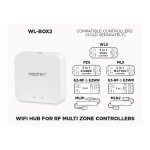 WL-BOX2 - WIFI HUB FOR RF MULTI ZONE
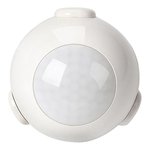 INTELLIGENT WIFI MOTION DETECTOR
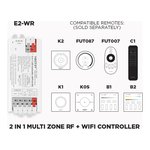 E2-WR 2 IN 1 RF + WIFI LED CONTROLLER (SINGLE COLOR AND CCT ADJUSTABLE WHITE) 1 TO 8 ZONES...
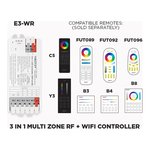 E3-WR 3 IN 1 RF + WIFI LED CONTROLLER (RGB - RGB+W - RGB+CCT) 1 TO 8 ZONES SELF REPEATING